


Blackboard
3.311.38K Reviews
App Specs
- Version
- 11.6.1
- Updated On
- License
- Free
- Downloads
- 10,000,000+
- Developer
- Anthology Inc.
- Categories
- Education
- Platform
- Android
Screenshots
 Analysis by AppCompare
Blackboard is the kind of education app I would judge less by its polished appearance and more by how reliably it handles the ordinary pressure of studying: checking a course announcement, opening an assignment, reviewing a grade, or finding a discussion before a deadline. Developed by Anthology Inc., it is a free learning app for Everyone, and its long presence in mobile education gives it a familiar role for students whose schools already use Blackboard.
My experience with it is best described as practical rather than exciting. It is not designed to replace a full desktop learning environment in every situation. Instead, it puts the most time-sensitive parts of a course within reach when I am away from a computer. That distinction matters. I find it useful as a companion for keeping up with coursework, but I would not treat it as my only study tool without first checking how extensively my institution has configured its Blackboard courses.
How Blackboard fits into everyday study
The app belongs to the education category and has been available since Jan 15, 2015. Its current version is 11.6.1, and it requires iOS 11 or later. That broad operating-system requirement makes it approachable for people using older compatible devices, although the quality of the experience still depends on the device, the school’s setup, and the course content itself.
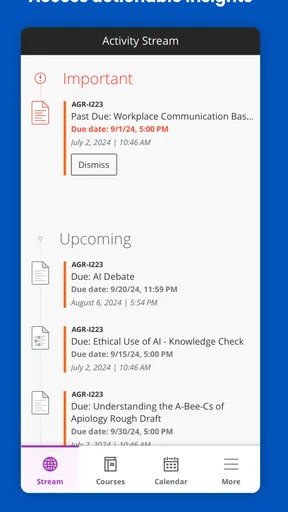
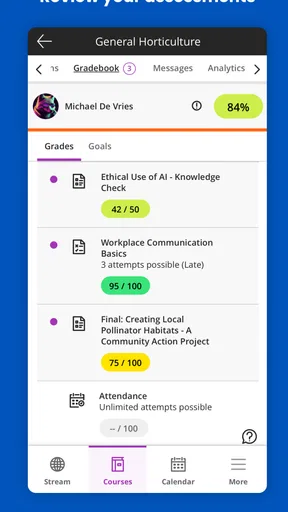
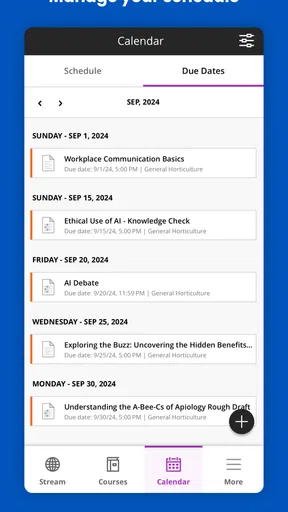
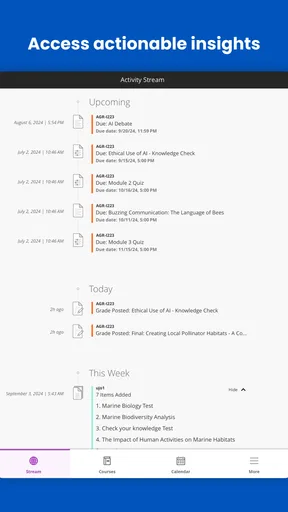
A realistic use case is a student commuting between classes. I might open the app to see whether an instructor has posted an announcement, confirm the due date of an assignment, read a short message, and check whether a grade has appeared. Those small checks can prevent a missed deadline without requiring me to carry a laptop everywhere. Blackboard works particularly well when I already know what I need to verify and want a quick route to it.
The app is less convincing when I need to do deep reading, write a long paper, compare several course documents, or work with complicated formatting. A phone screen encourages short sessions, and educational platforms can contain many layers of navigation. For serious writing or research, I still prefer a computer, where switching between sources and arranging files is more comfortable.
That makes Blackboard different from general note-taking apps, cloud storage, and messaging tools. Those alternatives may be better for creating personal study material, but they do not serve the same institutional purpose. Blackboard’s value comes from connecting me to course activity in one place. The trade-off is that its usefulness is tied closely to whether my school and instructors use the platform consistently.
What I would check before relying on it
The first question is not whether the app looks good; it is whether my institution supports the mobile experience I need. A school may use Blackboard mainly for announcements and grades, while another may place assignments, discussions, documents, and other course work there. I would sign in, open each active course, and inspect the areas I actually use before deleting other tools or assuming the app covers everything.
Worth Reading Before You Choose

EA SPORTS FC Mobile 26 Is a Bigger Football Game, but It Takes Time

Flipboard Shows What News Apps Must Do Beyond the Feed

Switching to Android Auto Means Rethinking Your Driving Routine

Google Calendar Makes a Crowded Week Easier to Manage

Ludo King Makes the Most of the Minutes Between Plans

Baby Panda World Brings Quick Play to Modern Phones, but Its Game Library Feels Busy
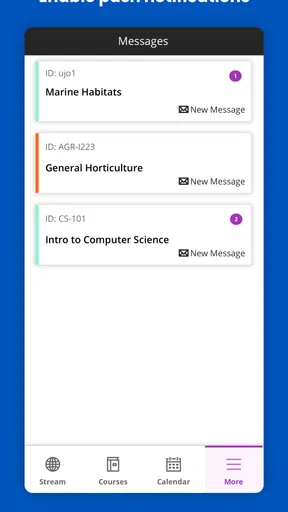
I would also test notifications in a low-risk way. If an instructor posts something important, I want to know whether the alert reaches me promptly and whether it takes me to the relevant course rather than leaving me to search. I would not assume that every course event appears in the same way. A sensible routine is to use the app for quick awareness while keeping the official course page and my own calendar as backup references.
Another useful habit is to distinguish viewing from completing. Seeing an assignment in the app does not automatically mean that submitting it there will be convenient. For a short response, mobile access may be perfectly adequate. For an attachment-heavy task or a carefully formatted document, I would prepare the work elsewhere and use the app only if the submission flow feels clear and dependable.
Trust comes from visible control, not appearance
Because Blackboard handles academic activity, trust is more important to me than a modern interface alone. The developer is Anthology Inc., and the app has an average rating of 3.3 from around 104 thousand ratings, alongside roughly 11 thousand written reviews. That mixed public response tells me to approach it realistically: many people find it useful, but the experience can vary enough that I should evaluate my own institution’s setup rather than rely on the score.
The app has passed the ten-million-install mark, which suggests that it is a familiar part of many students’ routines. Popularity is not proof that every workflow is smooth, though. In an education app, a login problem or unclear submission state can matter more than a visually attractive home screen. I pay attention to whether I can tell which account I am using, which course I am viewing, and what action has actually been completed.
Those visible distinctions are especially important on a shared device. Before checking grades or messages, I would confirm the active account and avoid leaving a session open where another person could access academic information. I would also review the app’s account and device settings in the context of my own school’s rules, rather than assuming that the mobile app should manage every privacy decision for me.
Blackboard is free to download, but “free” does not remove the practical cost of depending on it. I may still need an institutional account, a stable connection, and access to a browser or computer for certain tasks. I see the app as a convenient access point, not as a promise that the entire learning process can happen comfortably on a phone.
Data-sensitive moments deserve extra care
Education apps can bring together course messages, grades, assignment details, and personal work. That makes ordinary actions more sensitive than they may appear. I would avoid opening private academic information on a public screen, especially when travelling or studying in a crowded place. I would also think twice before sending a rushed message or uploading a file until I have checked the recipient, course, and attachment.
My cautious approach is simple: use the app for the task in front of me, then sign out or lock the device when appropriate. I would keep the operating system current, protect the phone with its own passcode, and inspect the app’s visible notification choices so that sensitive previews are not displayed unnecessarily. These are user-side safeguards, but they make a real difference when an app is used for academic records.
I would not treat an alert as a complete record. A notification can be useful for telling me that something changed, but I prefer to open the relevant course and verify the details there. This avoids acting on a truncated message or confusing an announcement with an assignment requirement. It also gives me a clearer sense of whether the item is new, already handled, or still waiting for action.
There is a second data-sensitive moment during submission. Before sending work, I would review the file name, the course destination, and any visible confirmation. If the assignment is important, I would keep my own copy and note when I submitted it. That is not a criticism unique to Blackboard; it is a sensible habit whenever academic work passes through a mobile interface.
Where the app gives me useful agency
The strongest form of control is knowing what I am doing at each step. I want to choose the course rather than depend on an ambiguous shortcut, decide when to open a message, and verify whether an assignment has moved from pending to submitted. Blackboard is most useful when it lets me make those decisions without forcing me to guess what a status means.
I also appreciate the freedom to use it selectively. I can make the app my quick-check tool while keeping long-form writing, file organization, and personal planning in other applications. That combination is more realistic than expecting one education platform to replace a calendar, word processor, cloud drive, and study notebook. The app becomes a focused window into institutional work instead of an attempt to control my entire workflow.
A practical routine is to check announcements at a set point in the day, review upcoming course tasks, and then leave the app rather than repeatedly refreshing it. I would record important deadlines in a separate calendar and use Blackboard to confirm changes. This reduces the risk of confusing a notification with a complete planning system and gives me a second place to notice a deadline.
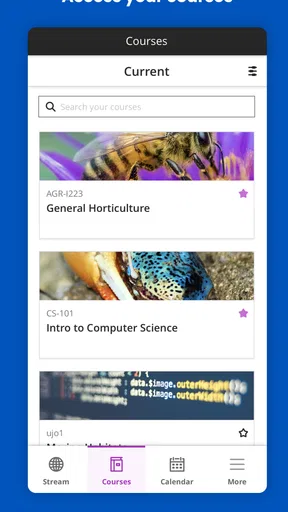
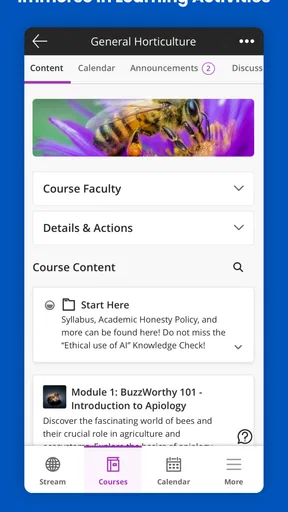
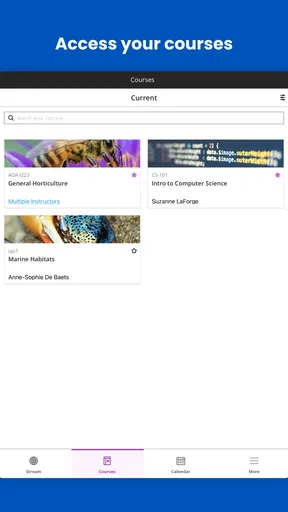
For instructors or students managing several courses, the main agency challenge is organization. I would avoid assuming that every course uses identical names or layouts. Opening each course and learning where its announcements, materials, discussions, and assessments appear can take time at first, but it prevents the more serious mistake of overlooking a course-specific area. The app can centralize access while the institution’s design still determines how orderly that access feels.
Who will appreciate it, and who may prefer something else
I would recommend Blackboard to students whose schools actively use it and who want mobile access to course updates, grades, messages, and assignment-related information. It is also a sensible choice for anyone who needs a quick check between classes or wants a backup route when a computer is unavailable. Its free price and Everyone content rating make it easy to try in an appropriate academic setting.
I would be more cautious recommending it to someone whose institution barely uses Blackboard. In that situation, an app cannot create missing course content or improve an instructor’s inconsistent workflow. A student who mainly needs personal study tools may be happier with a note-taking app, calendar, document editor, or file service. Those tools can offer a smoother experience for their specific jobs, even though they do not replace Blackboard’s connection to institutional course activity.
I would also steer heavy writers toward a desktop browser or computer-based workflow. Mobile access is convenient for checking and responding to smaller tasks, but long documents, detailed editing, and multi-file projects are usually easier elsewhere. The best setup is often a combination: Blackboard for official course activity, a larger screen for substantial work, and a personal calendar for planning.
My cautious verdict
After looking at Blackboard as an everyday education tool, I see a useful but highly context-dependent app. Its purpose is clear: give students a mobile way to stay connected with courses managed through Blackboard. When the institution’s course structure is organized, it can save time and reduce the need to reach for a laptop every time an announcement or grade needs checking.
Its limitations are equally important. The mobile format is not ideal for every academic task, and the public rating of 3.3 shows that convenience does not translate into a uniformly smooth experience. I would not rely on it blindly for a major submission, a private message, or a deadline without verifying the course details and keeping my own backup habits.
My recommendation is therefore conditional but positive: install it if your school uses Blackboard and you want a practical mobile companion. Start by testing login, course visibility, notifications, and the tasks you perform most often. Use it as a verified access point for your coursework, not as your only record of what matters. With that mindset, Blackboard can be genuinely helpful while leaving the final checks and sensitive decisions in your hands.
Pros
- Centralizes course materials
- announcements
- grades
- and assignments in one place.
- Push notifications help students keep track of deadlines and instructor updates.
- Supports document uploads
- discussion boards
- and assignment submissions.
- Works across Android and iOS
- making coursework accessible on mobile devices.
- Useful calendar and task views make it easier to organize academic responsibilities.
Cons
- The interface can feel cluttered when several courses are active at once.
- Some features depend on how the institution configures its Blackboard system.
- Large files and course content may load slowly on weaker mobile connections.
- Frequent notifications can become overwhelming without careful settings adjustments.
- Mobile functionality may not fully match the features available in the web version.
FAQs for Blackboard
What is Blackboard, and what can I use it for?
Blackboard is a digital learning platform used by schools, universities, and other educational organizations. After signing in through your institution, you can access course materials, announcements, assignments, grades, discussion boards, and sometimes live classes. The exact tools available depend on how your school has configured Blackboard, so some features may not appear in every course or account.
Is the Blackboard app free to download and use?
The Blackboard app is generally free to download on Android and iOS devices, but access is usually provided through a participating school or organization. You normally need valid institutional login details, and your school may need to enable mobile access. Downloading the app does not automatically provide access to courses, subscriptions, or educational content without an active account.
Can I submit assignments and take tests through Blackboard?
In many courses, Blackboard allows students to submit assignments, review feedback, and complete certain quizzes or tests from a mobile device. However, mobile support can vary depending on the course setup and assessment type. Before relying on the app for an important deadline, check the submission instructions and confirm that your file uploaded successfully.
Does Blackboard work without an internet connection?
Blackboard requires an internet connection for most activities, including logging in, opening current course content, submitting work, viewing updated grades, and participating in discussions. Some previously loaded information may remain temporarily available, but offline functionality is limited and should not be assumed. A stable Wi-Fi or mobile data connection is recommended for tests and file uploads.
Why can’t I log in or find my courses in Blackboard?
Login and course visibility problems are often related to using the wrong school selection, outdated credentials, an inactive enrollment, or an institution that has not enabled mobile access. Make sure you select the correct Blackboard system, enter your official account details, and update the app. If the problem continues, contact your school’s IT or Blackboard support team.


